


vCloud
vCloud Director Plugin for vCO – Login failed
I came across an issue today while installing a later version of the vCloud Director plugin for vCO which I didn’t see documented in the install guide. When enabling the plugin you have to provide details of one of your vCD cells and credentials. No matter what I tried I received the below error:
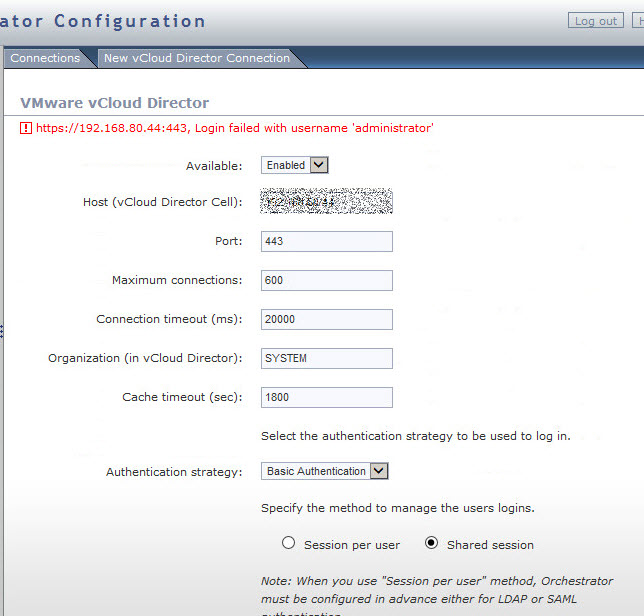
An idea came to me. What if I try to import the certificate for vCD into vCO under SSL Trust Manager next to the Network tab? Well you guessed it, that did the trick. Sure I didn’t have to do that in 5.1 so maybe something to look out for.
Please check out my sponsored link:
[adrotate group=”2″]
Another vCAC 6 Repo404 error
Today I decided to try to continue the rebuild of my lab and I fired up vCAC 6 and once again received an Repo404 error as seen in my previous post >here< . I decided reinstall time thinking I’d not fixed the problem the last-time but decided not to wipe out the old VMs. I got to the part where I’d all but finished preparing the IaaS server for install when I noticed my SQL database was not online……DOH…so there you have it, Repo404 error can also mean database problems.
Please check out my sponsored link:
[adrotate group=”2″]
Rackware = Next Gold Sponsor
I’m pleased to announce Rackware as the next gold sponsor.
Rackware is new to me but its something we are looking at in Canopy. The way I understand it right now is that its a platspin alternative but for cloud…. Exactly what we need…

RackWare brings intelligence and automation to the cloud, providing greater availability for enterprises, greater flexibility for enterprise IT users, and reduced costs for enterprise IT providers. Computing resources—physical, virtual, and cloud machines—can be easily and automatically scaled up or down as demand fluctuates
RackWare focus on delivering Cloud migrations and simplifying DRAAS. By enabling the easy migration of server workloads into and between cloud environments and Data Centers, we make it easier to migrate into, between and out of cloud / data centre infrastructure, simplifying cloud / data centre migration projects, reducing the cost and risk associated with these projects.
Rackware provide heterogeneous support for physical and virtual workloads, and private, public and hybrid clouds to allow easy workload mobility and elasticity, allowing you to basically move into and between your chosen cloud, or data center and then scale resources on demand in an easier fashion.
RackWare enables enterprises to easily and cost-effectively leverage private, public, or hybrid cloud environments without having to change applications or operating systems. The two major components are mobility and elasticity for both Enterprise User and Service Providers.
The Rackware approach enables users to scale cost effectively across private and public clouds without any application re-writes. Even better, RackWare lets users dynamically allocate between current infrastructure and cloud, and back again if need be.
This simplified approach results in marked savings in both capital and operational expenditures. RackWare is a truly heterogeneous approach that helps users avoid lock-in of server vendor, hypervisor, or cloud provider.
Client On-Boarding
RackWare provides a push button, automated mechanism to move existing workloads between different datacenters and clouds.
Disaster Recovery AAS in the Cloud
Combining both mobility and elasticity, RMM Disaster Recovery in the Cloud is an easy to use, economical solution that provides significantly improved support over traditional tape backup at a cost that is small fraction of maintaining a replicated datacenter.
Tools for Elasticity
• AutoScaling: RMM delivers automatic scaling for both private and public clouds as well as for datacenters based on real-time usage, load and performance.
• AutoParking: The RMM Policy Engine supports schedule-based AutoParking, which can be applied to hosts or group of hosts with a high degree of scheduling flexibility and detail.
• Cloud Bursting: RMM scales across one or many heterogeneous clouds so core applications and infrastructure stay in the datacenter and have peak usage demands met in the cloud.